
Hive Heating Only Guide: Smart Home Setup Tips for 2026
Smart heating is becoming an essential feature in UK homes as we approach 2026, driven by rising energy costs and a focus on sustainability. Hive heating only stands out by offering both efficiency and convenience, making it an ideal choice for households seeking smarter control over their heating.
Integrating smart home technology with hive heating only can help you save money, reduce energy waste, and ensure your home is prepared for the future. This guide provides clear steps for setting up hive heating only, optimising smart home integration, and resolving common issues.
Explore everything you need to master hive heating only in 2026, from installation basics to advanced automation.
Understanding Hive Heating Only: Features and Benefits
Smart heating is evolving rapidly, and hive heating only is a standout solution for UK households seeking simplicity, efficiency, and control. Unlike full-featured Hive Active Heating systems, hive heating only is tailored for those who need reliable heating management without the complexities of hot water control. This section explores what sets hive heating only apart, its key features, compatibility, and how it can transform your home's energy use.

What is Hive Heating Only and How Does It Differ?
Hive heating only is a smart thermostat solution designed for UK homes that require heating control without integrated hot water scheduling. This system is ideal for properties with combi boilers or those who already have separate hot water management. While Hive Active Heating offers both heating and hot water control, hive heating only streamlines the setup, focusing solely on efficient temperature regulation.
By removing hot water scheduling, hive heating only delivers a more affordable entry point for smart home integration, making it perfect for flats, smaller houses, or modern homes with on-demand hot water systems.
Key Features and Components of Hive Heating Only
At the heart of hive heating only is a wireless thermostat, which communicates with a receiver installed near your boiler and a central Hive Hub. The hub connects to your home Wi-Fi, allowing seamless app control from anywhere.
Core features include:
- Wireless thermostat with clear digital display
- Hive Hub for smart connectivity
- Boiler receiver for direct heating control
- Intuitive mobile app for scheduling and remote access
These components work together to let you adjust temperatures, set routines, and monitor your heating, all from your smartphone or tablet. The system is designed for easy installation and minimal disruption to your décor.
Compatibility with Common UK Boiler Types
Hive heating only is compatible with most UK boilers, including combi, system, and conventional models. Before installation, it's important to confirm that your boiler supports on/off control via standard wiring. Most modern boilers meet these requirements, making hive heating only a versatile choice.
If your home has an existing wired thermostat, the installation process can often use the same wiring. For older systems, a quick upgrade may be necessary, but the flexibility of hive heating only ensures broad compatibility across UK properties.
Energy-Saving Benefits and Estimated Cost Savings
One of the main attractions of hive heating only is its potential to lower energy bills and reduce waste. By enabling precise scheduling and remote control, you can tailor heating to your lifestyle, avoiding unnecessary heating when no one is home.
Industry averages suggest that smart thermostat users can save up to £120 per year on energy bills. Features such as geolocation, which automatically adjusts heating based on your location, and adaptive scheduling, further enhance efficiency. For a deeper dive into these advantages, see this guide on the benefits of installing a smart thermostat.
User-Friendly Aspects: Scheduling, Remote Access, and Geolocation
Hive heating only puts control in your hands. The intuitive app lets you:
- Create tailored heating schedules for weekdays and weekends
- Use quick actions for instant boosts or overrides
- Enable geolocation to turn heating off when you leave and on as you return
- Access your heating system remotely, whether at work or on holiday
These features are designed with busy households in mind, offering flexibility and peace of mind.
Security and Data Privacy Improvements for 2026
By 2026, hive heating only systems are expected to offer enhanced security protocols, including encrypted communications between devices and stricter data privacy controls. Regular firmware updates will address vulnerabilities, ensuring your smart heating remains secure against evolving cyber threats.
Comparison: Hive Heating Only vs Other Smart Thermostats
Let’s compare hive heating only to popular competitors:
| Feature | Hive Heating Only | Nest Thermostat | Tado Smart Thermostat |
|---|---|---|---|
| Wireless Control | Yes | Yes | Yes |
| App Scheduling | Yes | Yes | Yes |
| Geolocation | Yes | Yes | Yes |
| Hot Water Control | No | Yes | Optional |
| Works with Alexa/Google | Yes | Yes | Yes |
| Estimated Annual Savings | £120 | £130 | £100 |
| UK Boiler Compatibility | High | High | High |
Hive heating only holds its own against major brands, offering robust features at a competitive price, especially where hot water control is not required.
Typical UK Households That Benefit from Hive Heating Only
Hive heating only is particularly well-suited to:
- Flats and smaller homes with combi boilers
- Households with separate hot water systems
- Renters or first-time buyers seeking affordable smart upgrades
- Busy families who value scheduling and remote control
Adopting hive heating only not only future-proofs your home but also helps you take control of your comfort and costs.
Preparing for Your Hive Heating Only Installation
Preparing for your hive heating only installation is a crucial step toward a smarter, more efficient home. Whether you are upgrading from a traditional thermostat or embracing smart controls for the first time, careful planning ensures a seamless experience and long-term benefits.

Assessing Your Home’s Heating System
Before starting your hive heating only setup, assess your existing heating system. Most UK homes use combi, system, or conventional boilers. Hive heating only is compatible with many models, but verifying your boiler type is essential. Check if your current thermostat wiring is suitable for smart controls. Some older systems may require rewiring or a power supply upgrade.
Reliable Wi-Fi is necessary for optimal performance. Test signal strength near your intended installation spots, especially where the hub and receiver will sit. A strong connection ensures you can control your heating remotely and receive real-time updates.
Safety is paramount. For installations involving boiler wiring, a Gas Safe registered engineer is often recommended and may be required to meet UK regulations. Make sure you have a smartphone or tablet compatible with the Hive app. If you are new to smart heating, reviewing a smart heating controls guide can help you understand the basics before proceeding.
Gathering Tools and Materials
Gathering the right tools and materials streamlines the hive heating only installation process. You will need the complete Hive kit: thermostat, hub, receiver, and all necessary cables. Have your boiler manual at hand, along with your Wi-Fi credentials for hub setup.
Basic tools include:
- Insulated screwdriver
- Drill (for wall mounting)
- Voltage tester
- Safety gloves and goggles
Prepare the installation area by clearing space around your boiler and control points. Always turn off the power at the fuse box before starting any work. Sourcing genuine Hive products from official retailers is vital to avoid compatibility issues or voided warranties. Avoid counterfeits by checking packaging and authorised sellers. This preparation step ensures your hive heating only system works reliably from day one.
Professional vs. DIY Installation: Pros and Cons
Choosing between professional and DIY installation for hive heating only depends on your confidence, skills, and priorities. Professional installation offers peace of mind. Certified engineers ensure your system is set up safely, complies with UK standards, and maintains your warranty. Booking a professional is straightforward; many companies allow online scheduling and provide detailed service breakdowns. Costs typically range from £70 to £150 and installations are often completed within one to two hours.
DIY installation appeals to those comfortable with basic wiring and following manufacturer instructions. It is cost-effective, with no labour charges, but comes with risks. Common pitfalls include incorrect wiring, poor Wi-Fi setup, or damaging the receiver. These mistakes can impact both safety and system reliability. If you choose DIY, carefully follow the Hive manual and use diagnostic features within the app.
Consider the following table to compare both approaches:
| Installation Option | Cost | Time Required | Safety & Warranty | Common Pitfalls |
|---|---|---|---|---|
| Professional | £70–£150 | 1–2 hours | Fully covered | Minimal |
| DIY | Free (tools) | 2–4 hours | Limited, risky | Wiring errors, downtime |
Some users have had success with DIY installs, especially in newer homes with clear wiring and strong Wi-Fi. However, if you are unsure, opting for professional help protects both your investment and your home insurance. Remember, incorrect installation may void your warranty and cause long-term issues with your hive heating only system. Ultimately, the right choice balances cost, convenience, and peace of mind.
Step-by-Step Hive Heating Only Setup for 2026
Setting up your hive heating only system in 2026 is straightforward with the right preparation. This section walks you through unboxing, installing, configuring, and verifying your new smart heating setup, ensuring a smooth transition to efficient home comfort.
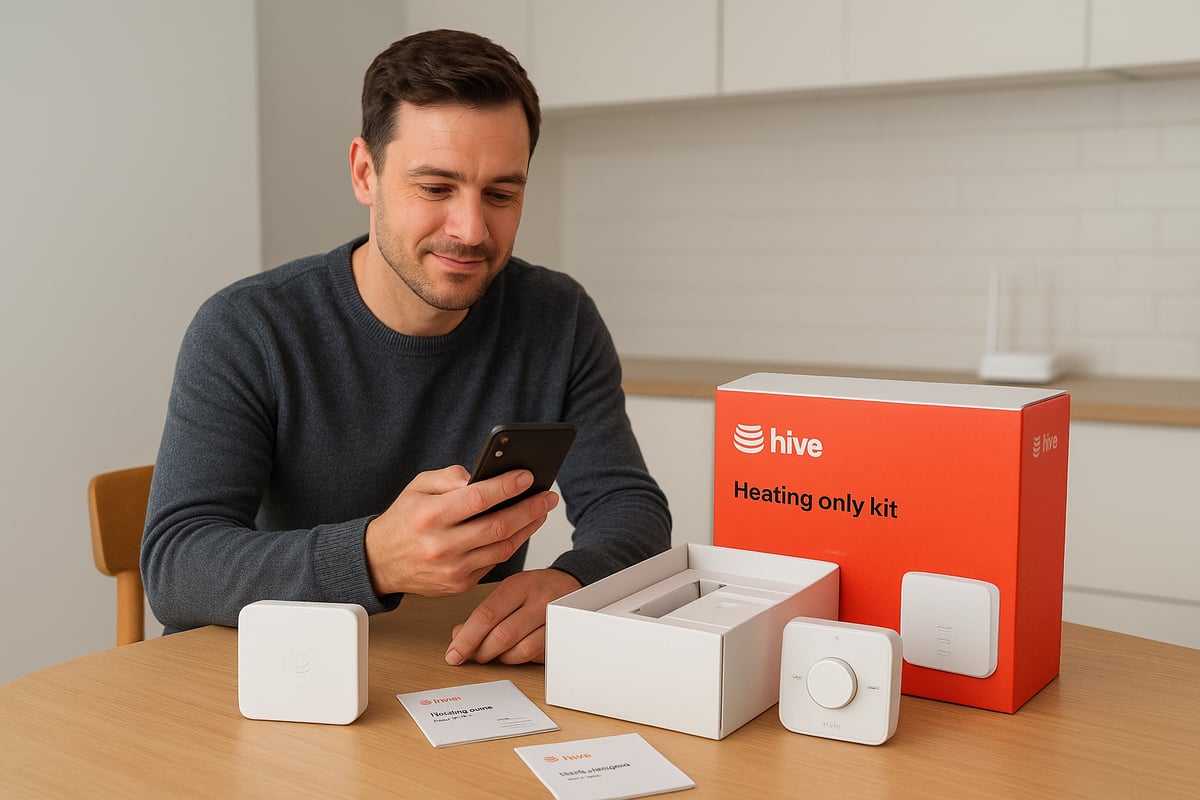
Unboxing and Initial Setup
Begin your hive heating only journey by carefully unpacking the kit. Inside, you should find the wireless thermostat, receiver, hub, power cables, Ethernet cable, and mounting accessories. Double-check each item for any signs of damage before proceeding.
Before touching any devices, register your Hive account through the app or official website. This ensures access to all features and future updates. Next, connect the Hive Hub to your Wi-Fi router using the supplied Ethernet cable. Plug in the hub and watch for indicator lights to confirm it is powered and online.
Download the Hive app for iOS or Android and log in with your new account details. The app will prompt you to update the firmware if needed. Keeping your hive heating only devices up to date is essential for security and performance.
Always work in a clutter-free area and keep your boiler manual and Wi-Fi credentials close at hand. These first steps lay the groundwork for a successful installation, allowing your hive heating only system to communicate seamlessly from the outset.
Installing the Receiver and Thermostat
Now, you are ready to install the receiver and thermostat. Choose a spot for the receiver near your boiler, away from direct heat or cold sources. The thermostat should be placed on an internal wall at chest height, also avoiding radiators and windows for accurate temperature readings.
For your safety, turn off power to the boiler and heating circuit at the fuse box. Use a voltage tester to confirm the circuit is not live before continuing. Follow the colour-coded wiring diagrams in the Hive manual to connect the receiver to your boiler. Secure the receiver firmly before restoring power.
Mount the thermostat on the wall with the supplied screws, or use the desk stand for flexible placement. Once installed, power up the system and pair the thermostat with the Hive Hub and receiver through the app. The app will guide you step by step, confirming when the hive heating only devices have successfully connected.
If you encounter issues with pairing, check your Wi-Fi strength and ensure all components are within range. Proper installation is the foundation for reliable hive heating only performance and long-term energy savings.
Configuring Schedules and Heating Modes
After installation, it is time to tailor the hive heating only system to your daily routine. Start by setting up heating schedules for weekdays and weekends within the Hive app. Define temperature set points that balance comfort and efficiency, adjusting for times when your home is empty.
Enable geolocation features to allow your system to adjust automatically as you come and go. This ensures your hive heating only system only heats your home when needed, reducing wasted energy. The holiday and away modes are particularly helpful for longer absences, safeguarding both your budget and your boiler.
Take advantage of quick actions and boost functions for instant warmth on cold mornings. If your schedule changes, you can override programmed settings at any time. For example, families can set comfort temperatures for early mornings and evenings, while shift workers can customise their own patterns.
Experiment with different schedules and modes to find what suits your lifestyle best. The flexibility of the hive heating only system means you are always in control, no matter how unpredictable life becomes.
Testing and Verifying Your Setup
With configuration complete, run a test cycle to check that your boiler responds to commands from the thermostat and app. Monitor notifications for confirmation that changes are being received. Use the Hive app to control your system remotely and verify response times.
Check that your Wi-Fi connection is stable and that the signal reaches all hive heating only components. If you notice issues such as devices dropping offline, reposition the hub or consider a Wi-Fi extender. For any persistent problems, use the diagnostic tools in the app or consult your boiler manual.
It is important to avoid common mistakes with smart thermostats, such as incorrect wiring or poor placement, which can lead to setup errors and inefficiency. For practical advice, review this guide on common mistakes with smart thermostats to ensure your system runs smoothly from day one.
Finally, validate that energy usage tracking is working and record baseline data. This will help you monitor savings and optimise your hive heating only setup over time.
Integrating Hive Heating Only with Your Smart Home Ecosystem
Integrating hive heating only with your smart home ecosystem maximises both convenience and efficiency. By connecting your heating system to voice assistants, sensors, and automation tools, you unlock a new level of control and energy savings. This section explains how to make hive heating only work seamlessly with your broader smart home setup.

Connecting to Voice Assistants and Smart Hubs
Hive heating only is designed to work with major voice assistants, including Amazon Alexa, Google Assistant, and Apple HomeKit. Connecting your system to these platforms is straightforward. Start by ensuring your Hive Hub is online, then open your chosen assistant's app and add Hive as a device. You will be prompted to log in to your Hive account and grant permissions.
Once linked, you can control hive heating only using simple voice commands. For example, "Alexa, set the heating to 20 degrees" or "Hey Google, turn off the heating." These integrations allow you to adjust the temperature, check current settings, or activate boost mode with just your voice.
You can also build routines, such as a "Good Morning" sequence that warms your home as part of your daily schedule. Security improvements in 2026 mean your data and device access are better protected than ever. If you encounter connection issues, check Wi-Fi strength, ensure firmware is up to date, and restart both your hub and assistant device.
The financial benefits of integrating hive heating only have been significant for UK households. According to Centrica, Hive Users Save £500 Million on energy bills collectively, highlighting the power of smart home integration.
Adding Smart Sensors and Devices
Enhancing hive heating only with additional smart sensors and devices can further improve comfort and efficiency. Window and door sensors are particularly valuable; when a window is opened, the heating can automatically pause to prevent energy waste. Pairing smart thermostatic radiator valves (TRVs) with hive heating only enables room-by-room temperature control, optimising comfort for every family member.
Motion sensors offer another level of automation. When movement is detected, hive heating only can activate heating in specific areas, ensuring warmth is provided only where needed. This targeted approach reduces unnecessary energy use.
Hive heating only is compatible with many leading smart home brands, such as Philips Hue and Ring. For example, you can set up automation rules like turning off the heating when a window sensor is triggered or boosting heating when the front door is unlocked. These integrations make hive heating only a flexible choice for a wide range of UK households.
Advanced Automation and Energy Management
Taking automation further, hive heating only supports geofencing features. Your system can detect when you leave or approach home, adjusting heating accordingly to save energy without sacrificing comfort. Platforms like IFTTT allow even more custom automation, such as syncing heating schedules with your calendar or local weather forecasts.
Energy management tools within the Hive app provide insights into your heating patterns and energy usage. By monitoring this data, you can identify opportunities to reduce consumption and costs. Hive heating only can also integrate with solar panels or dynamic energy tariffs, helping you make the most of renewable energy sources.
Optimising your system’s performance is not just about convenience—it is also a step towards reducing your carbon footprint. With hive heating only, you can easily track and adjust your energy use, supporting both household savings and sustainability goals.
Troubleshooting and Maintenance for Hive Heating Only
Smart heating systems are designed for reliability, but even the most advanced setups sometimes encounter hiccups. If you use hive heating only, knowing how to troubleshoot and maintain your system ensures comfort and efficiency all year round. This section guides you through the most common issues, essential fixes, and long-term care tips for your hive heating only solution.
Common Issues and Quick Fixes
Even with hive heating only, users may face a few recurring problems. The most reported issues include:
- Devices appearing offline in the app
- Unresponsive thermostats or receivers
- App errors or delayed notifications
To address offline devices, first check your Wi-Fi connection and ensure the hub is powered. Restart your router if needed. For an unresponsive thermostat, replace the batteries and confirm it is paired with the receiver. If the app shows errors, close and reopen it or log out and log back in.
Energy savings and reliability are key reasons people choose hive heating only. According to industry data, connectivity issues are among the most common user complaints, but most can be resolved with basic checks. For a deeper look at how smart thermostats perform and the typical issues resolved by owners, visit this Smart Thermostat Energy Savings Data resource.
If problems persist, consult your boiler manual or the Hive support portal for device-specific guidance. Documenting error codes or unusual behaviour will help if you need professional support.
Resetting and Updating Your Hive Heating Only System
If your hive heating only setup stops responding or cannot connect to the app, a system reset is often the best next step. Begin by powering off your boiler and Hive receiver. Wait 30 seconds, then turn them back on. This can resolve many connectivity problems.
For a full reset, use the pinhole button on the Hive receiver, following the manufacturer’s instructions. After resetting, re-pair your thermostat and hub as described in the setup guide.
Regular software updates are vital for maintaining security and performance. Check the Hive app for firmware updates and install them promptly. Keeping your app up to date helps prevent compatibility issues and ensures access to the latest features for your hive heating only system.
Maintenance Tips and Support
Proper maintenance keeps hive heating only running smoothly. For wireless thermostats, replace the batteries every 12-24 months or as soon as you see a low battery warning. Clean the thermostat and receiver with a dry cloth to prevent dust build-up.
Periodically check your Wi-Fi signal strength near the Hive hub and receiver. If you experience frequent dropouts, consider moving your router or using a Wi-Fi extender. Inspect boiler connections every few months to ensure they remain secure.
If you encounter persistent issues, reach out to Hive customer support. Keep your purchase details and warranty information handy for faster service. Regularly reviewing your system’s performance and scheduling annual boiler checks will help you get the most from your hive heating only investment.
Future-Proofing Your Hive Heating Only Setup for 2026 and Beyond
Future-proofing your hive heating only setup is essential as smart home technology evolves rapidly. By staying ahead of the curve, you ensure your system remains efficient, secure, and compatible with upcoming innovations. Let’s explore the latest updates, upgrade opportunities, and how hive heating only can support your sustainability goals.
Upcoming Features and Updates
The future of hive heating only promises several notable enhancements. Anticipated software updates will bring more intuitive scheduling, improved data privacy, and responsive interfaces. Hardware advances are expected to deliver greater battery life and enhanced wireless range, making your system more robust.
Artificial intelligence will play a major role. AI-driven heating routines will learn from your habits and weather forecasts, optimising comfort and reducing waste. Interoperability is also set to improve, with hive heating only expected to integrate seamlessly with more smart home ecosystems, including emerging platforms and devices.
Regulatory changes are on the horizon. New standards for data security and energy reporting will shape how hive heating only interacts with other technologies. Industry forecasts predict a significant increase in smart home adoption, reinforcing the value of maintaining a future-ready setup.
Upgrading and Expanding Your System
Hive heating only is designed for flexibility. As your needs change, you can add zones for individual room control or upgrade to full Hive Active Heating for hot water management. Expansion is straightforward, often requiring only additional thermostats or compatible receivers.
To ensure ongoing compatibility, review your wiring and Wi-Fi infrastructure periodically. Investing in high-speed broadband and smart-ready wiring can help your hive heating only system support new devices as they launch. Many UK households have successfully scaled their systems, starting with a single zone and gradually integrating smart sensors, radiator valves, and voice assistants.
Consider scheduling annual system reviews. These allow you to assess the latest features, explore new integrations, and future-proof your setup against obsolescence. Upgrading ensures your hive heating only system remains at the forefront of smart home technology.
Sustainability and Energy Efficiency Goals
Hive heating only directly supports the UK's sustainability targets by promoting energy efficiency and reducing carbon emissions. Smart scheduling, geolocation, and integration with renewables all contribute to lower energy use. According to Energy Savings with Smart Thermostats, UK households can save up to £150 annually on heating bills, while reducing CO2 output.
Adopting hive heating only also aligns with broader trends, as Smart Home Energy Efficiency Statistics show that over half of smart home users report lower energy bills. Combining hive heating only with government incentives and improved insulation can further maximise your home's sustainability and future-readiness.
Frequently Asked Questions about Hive Heating Only
Smart thermostats are central to modern UK homes, and many people have questions about hive heating only. Below, we answer the most common queries to help you get the most from your setup, whether you are new to smart heating or looking to upgrade.
What is Hive Heating Only and who should use it?
Hive heating only is a simplified smart heating solution designed for homes with a single heating zone and no hot water control required. It is ideal for flats, small houses, or properties with combi boilers that do not need separate hot water scheduling. The system is straightforward to install and control, making it suitable for busy professionals, small families, and landlords seeking energy efficiency.
Is my boiler compatible with Hive Heating Only?
Most UK combi, system, and conventional boilers work with hive heating only, but you should always check the manufacturer’s compatibility list. If you have an older boiler or unique wiring, a professional assessment is recommended. Ensure your Wi-Fi signal is strong where you plan to place the Hive Hub and thermostat for uninterrupted performance.
How does Hive Heating Only differ from Hive Active Heating?
Hive heating only controls your central heating but not hot water. In contrast, Hive Active Heating can manage both heating and hot water, making it better suited for larger homes or those with separate hot water tanks. If your needs change, upgrading from hive heating only to Active Heating is usually straightforward, but may require additional hardware.
| Feature | Hive Heating Only | Hive Active Heating |
|---|---|---|
| Central heating control | Yes | Yes |
| Hot water control | No | Yes |
| Multi-zone support | Limited | Full |
| App and voice assistant support | Yes | Yes |
What features does the Hive app offer and how secure is it?
The Hive app lets you schedule heating, control temperature remotely, enable geolocation, and monitor energy use. Security is a high priority, with regular software updates and enhanced encryption expected by 2026. For a comparison of types of smart thermostat features, you can explore third-party resources to see how hive heating only matches up with other brands.
Can I install Hive Heating Only myself or do I need a professional?
DIY installation is possible for those comfortable with basic electrical work and boiler wiring, but hiring a Gas Safe registered engineer is safer and ensures compliance with UK regulations. Professional installation protects your warranty and can cost between £70 and £150, while DIY is free but riskier. Always switch off power before starting, and consult the manual.
How do I migrate from an existing thermostat to Hive Heating Only?
First, remove your old thermostat and receiver, ensuring power is off. Install the Hive receiver in its place, wire it according to the colour-coded diagrams, and follow the pairing instructions in the Hive app. Most users find the process straightforward, but complex systems or unusual wiring may need expert help.
What are the most common troubleshooting steps?
If hive heating only is unresponsive, try these steps:
- Check Wi-Fi connection and signal strength.
- Restart the Hive Hub and app.
- Replace thermostat batteries if needed.
- Use the app’s diagnostic tools for further checks.
- Reset the system if problems persist.
For persistent issues, contact Hive support or visit user forums for community advice. Regular app updates and battery checks can prevent most problems.
What warranty and support come with Hive Heating Only?
Hive heating only typically includes a one or two-year warranty, depending on the retailer. Support is available through the Hive website, phone, and user communities. Keep your purchase details and installation records for future reference. Extended warranties may be available for an extra fee.
Where can I find more information or connect with other users?
Official Hive resources, online forums, and social media groups provide valuable advice and troubleshooting help. Most searched questions about hive heating only include compatibility, setup tips, and app features, reflecting the needs of modern UK households.
If you’re ready to make your home smarter, more efficient, and future proof with Hive Heating Only, you don’t have to tackle it alone. Whether you’re at the planning stage, considering professional installation, or want to ensure everything runs smoothly for years to come, having experienced, Gas Safe registered engineers by your side can make all the difference. With over 20 years of expertise and a commitment to keeping homes across Kent warm and energy efficient, we’re here to help every step of the way.
Keeping Homes in and around kent Warm, Dry & Flowing Book with castle heating kent

